
Campaign: Basic Info
Understand every field in the Campaign Basic Info wizard — from naming and advertiser selection to scheduling, revenue, and payout configuration.
Overview
Campaigns are the core engine of your tracking setup. They define offers, publishers, and conversion rules in one centralized system.
With campaigns, you can generate tracking links, apply targeting rules, configure payouts, and manage creatives efficiently.
Before you start
You must create an advertiser first. Create Advertiser
Basic Info Fields
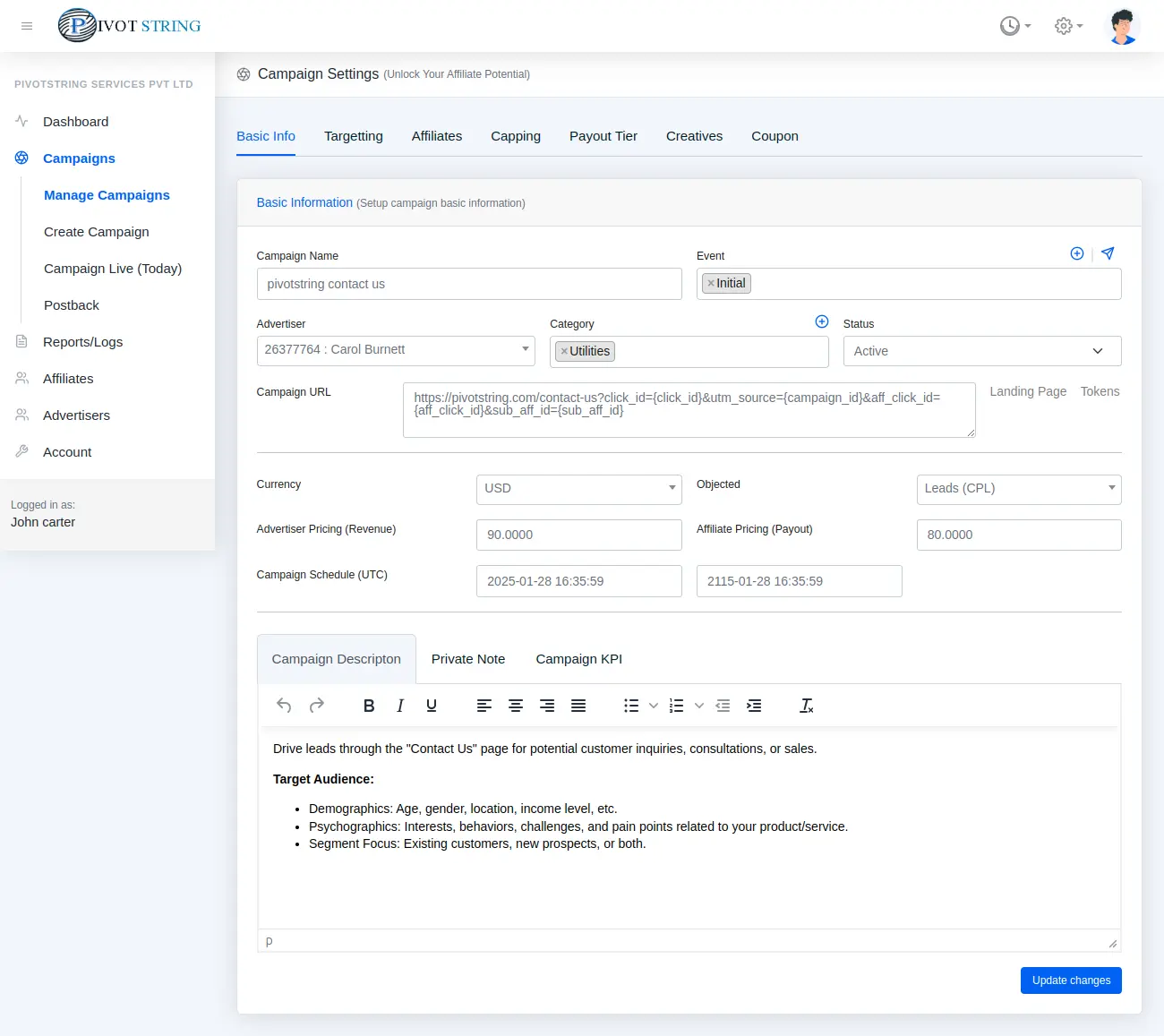
| Field | Description |
|---|---|
| Campaign Name required | Descriptive name of the campaign. |
| Advertiser required | Select advertiser associated with this offer. |
| Campaign URL required | Destination URL with macros like {CLICK_ID} |
| Revenue | Amount earned per conversion. |
| Payout | Amount paid to affiliates. |
Important
Payout must always be less than or equal to Revenue to avoid losses.
Was this page helpful?
0 / 500
Thanks for your feedback!