
Campaign Targeting
Configure advanced targeting rules to deliver campaigns to the right audience and maximize performance.
Overview
Pivotstring provides advanced targeting options such as country, city, browser, device, and operating system.
You can also define custom targeting rules to control traffic quality and optimize campaign performance.
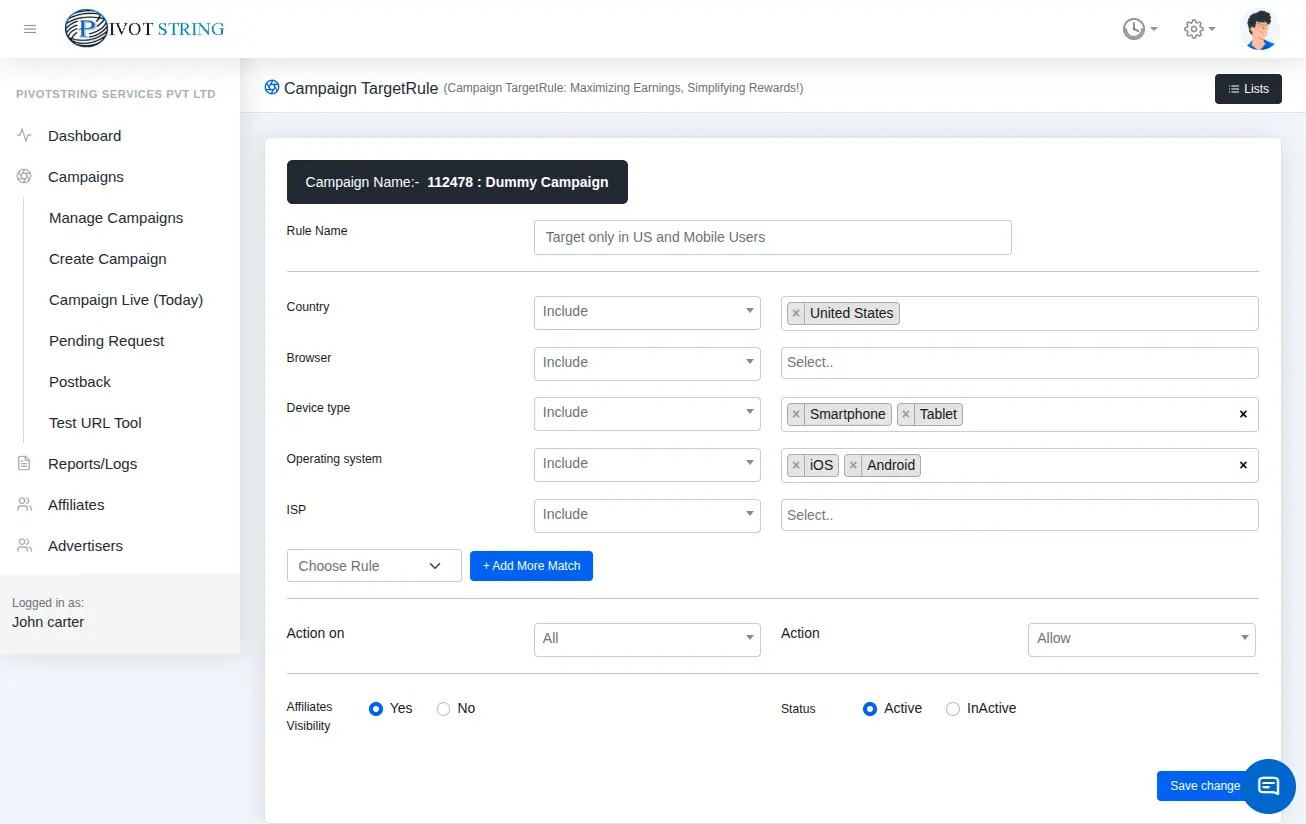
Targeting Rules Behavior
1. No Target Rules
If no rules are defined, the campaign is open to all traffic.
2. Rules Defined
If rules exist, the system evaluates them as follows:
- Check all defined rules against the incoming request.
- If a rule matches, evaluate its action type.
Action Types
- Allow — Accept traffic
- Fallback — Redirect to fallback campaign
- Reject — Block the request
Default Behavior
If no rule matches, the system rejects the request by default.
Targeting Parameters
| Parameter | Description |
|---|---|
| Country | Allow or block specific countries |
| State | Allow or block specific states |
| City | Allow or block specific cities |
| Browser | Allow or block browsers |
| Device | Allow or block device types |
| Operating System | Allow or block OS |
| OS Version | Allow or block OS versions |
| Device Brand | Filter by brand |
| ISP | Filter by internet provider |
| User Language | Filter by browser language |
| Source | Filter by traffic source |
| Referral | Filter by referral domain |
| Aff Click ID | Filter by click ID |
| Sub Aff ID | Filter by sub-affiliate ID |
| Sub Aff ID 1–6 | Advanced sub-ID targeting |
| Google ID | Target Google Advertising ID |
| Device ID | Filter by device ID |
| Android ID | Target Android devices |
| IOS ID | Target iOS devices (IDFA) |