
Capping Rules
Control campaign delivery using capping rules to limit impressions, clicks, or conversions within a defined timeframe.
Overview
Capping rules help optimize budget allocation, prevent oversaturation, and improve campaign performance by controlling event frequency.
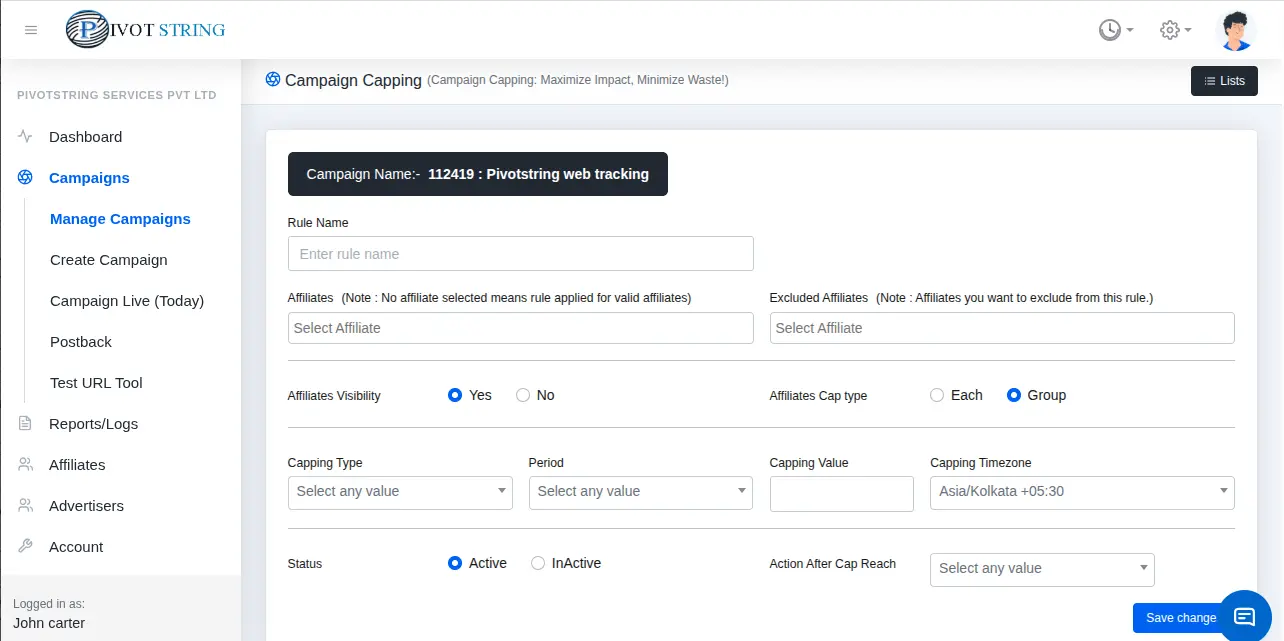
Capping Rule Parameters
| Parameter | Description |
|---|---|
| Rule Name | Name of the capping rule. |
| Include Affiliate | Applies rule to selected affiliates. If empty, applies to all. |
| Exclude Affiliate | Affiliates excluded from this rule. |
| Capping Type | Conversions, Revenue, or Payout metrics (Gross/Approved). |
| Period | Hourly, Daily, Weekly, or Monthly. |
| Capping Value |
|
| Action After Cap | Choose system behavior after limit is reached. |
| Status | Enable or disable the capping rule. |
Action After Cap Reach
- Pending – Conversions marked as pending.
- Accept – Conversions continue normally.
- Reject – Excess conversions rejected.
- Stop Campaign – Campaign pauses automatically.