About Campaign Targeting

# Overview

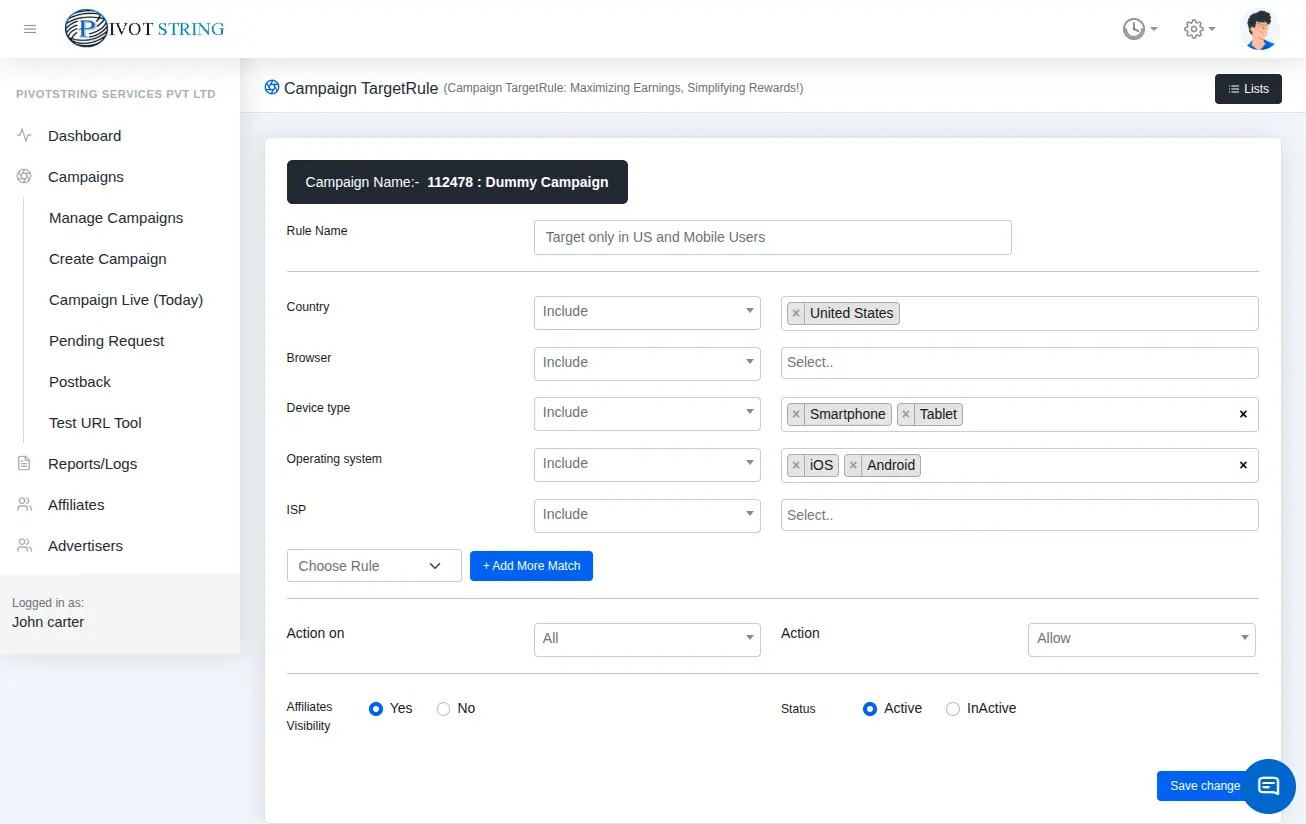
With advanced targeting options, you can configure precise delivery rules to reach the exact audience your campaign needs. PivotString provides multiple common targeting criteria such as country, city, browser, device, brand, and operating system. Additionally, you can define and manage custom targeting rules, giving you the flexibility to optimize traffic quality and ensure high campaign performance.

Campaign Targeting

# Campaign Targeting Rules – System Behavior

This section describes how the system determines whether a campaign is eligible based on defined targeting rules.

1. No Target Rule Defined

If a campaign has no targeting rules, the system treats the campaign as open to all. The campaign is accepted without any rule-based validation.

2. Target Rule(s) Defined

If a campaign has one or more targeting rules, the system performs the following steps:

Rule Matching

The system checks all defined rules to determine if any rule matches the incoming request or context.

Action Type Evaluation

If a matching rule is found, the system evaluates the rule’s Action Type, which can be one of the following:

  • Allow → The campaign is accepted.
  • Fallback → The system redirects the request to a fallback campaign or workflow.
  • Reject → The campaign is rejected.

No Matching Rule

If none of the defined rules match, the system rejects the campaign by default.

# Targeting Parameters

Below is a list of available targeting options you can configure for each campaign:

ParameterDescription
CountryAllow or block specific countries in the campaign.
StateAllow or block specific states in the campaign.
CityAllow or block specific cities in the campaign.
BrowserAllow or block specific web browsers.
DeviceAllow or block mobile, desktop, or tablet devices.
Operating SystemAllow or block specific operating systems.
OS VersionAllow or block specific versions of an operating system.
Device BrandAllow or block brands such as Samsung, Apple, Xiaomi, etc.
ISPAllow or block traffic from specific Internet Service Providers.
User LanguageAllow or block traffic based on user browser language.
SourceAllow or block traffic from specific traffic sources.
ReferralAllow or block traffic coming from specific referral URLs or domains.
Aff Click IDTarget or block traffic based on the affiliate click ID.
Sub Aff IDFilter traffic based on the sub-affiliate ID.
Sub Aff ID 1Allow or block traffic using the first sub-affiliate ID parameter.
Sub Aff ID 2Allow or block traffic using the second sub-affiliate ID parameter.
Sub Aff ID 3Allow or block traffic using the third sub-affiliate ID parameter.
Sub Aff ID 4Allow or block traffic using the fourth sub-affiliate ID parameter.
Sub Aff ID 5Allow or block traffic using the fifth sub-affiliate ID parameter.
Sub Aff ID 6Allow or block traffic using the sixth sub-affiliate ID parameter.
Google IDTarget or filter traffic based on the Google Advertising ID.
Device IDAllow or block traffic from specific device IDs.
Android IDTarget traffic coming from specific Android devices using Android ID.
IOS IDTarget traffic coming from specific iOS devices using Apple ID or Identifier for Advertisers (IDFA).

Ready to Boost Your Conversions?

Start leveraging Pivotstring's powerful tracking software today and take your business to the next level.

Get Started Now